 CloudEdge App 文档
ulofy 智能 WiFi 高清摄像头 (PTcam) 快速入门指南
Quick start guide for the ulofy PTcam Smart WiFi HD camera, covering what's included, product overview, CloudEdge app setup, mounting, account registration, step-by-step WiFi pairing, and safety information.
This quick start guide walks you through setting up the ulofy Smart WiFi HD Camera (PTcam) with the CloudEdge app, from unboxing and mounting to registering an account and pairing the camera to your WiFi.
此 WiFi 相机只能连接到 2.4GHz WiFi 信号 — 它不支持 5GHz WiFi。设置应用程序时请选择 2.4G WiFi。如需更多帮助,请参阅常见问题解答。
ulofy 护理
您好客户,
感谢您选择我们的安全产品。我们始终将客户放在第一位。在使用本产品之前,您应该了解 3 件事:
- Micro SD card — If you don't have a Micro-SD card available at home now and don't want to spend extra time choosing one, please contact us directly.提示:Micro-SD 卡插入后必须进行格式化。
- 选择2.4G Wi-Fi — 本产品仅支持2.4G Wi-Fi,请在设置应用程序时选择2.4G Wi-Fi。
- Select installation location — Please use your mobile phone to test the coverage of the home wifi signal at the planned installation position before installation, so that the product can receive a better signal.
Get all the tutorial videos of using product including but no limit to set up the app, installation and format micro SD card, visit: www.getulofy.com
立即通过以下两种方式加入我们,通过一对一实时聊天和电话服务技术支持解决您的所有问题。
1. What's Included
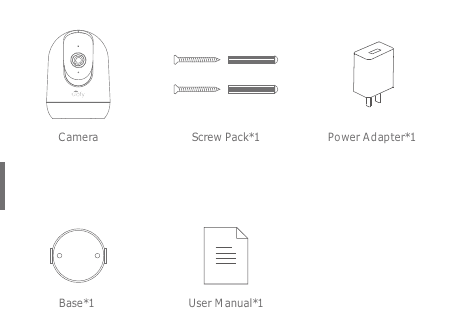
- Camera
- 螺丝包 ×1
- 电源适配器 ×1
- 底座 ×1
- 用户手册 ×1
2. 产品概述
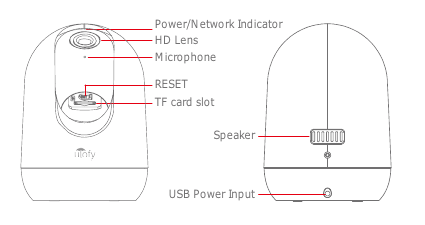
- 电源/网络指示灯
- 高清镜头
- 麦克风
- RESET
- TF 卡槽
- 演讲者
- USB 电源输入
注意:请按照图示方向插入Micro SD卡。 Micro SD 如果插入不正确,卡可能会卡住,并且设备可能会损坏。
- SD 卡端口: 支持微型 SD 卡进行本地存储(最大 128GB)。
- 重置按钮: 用于将相机恢复至出厂设置。 (按住 5-8s)
- 卡容量要求: 8-128GB。
- 读写速度要求: Class10 级别。
- 文件格式: FAT32。
3. CloudEdge 应用程序安装和设置
在Apple Store或Google Play中搜索“CloudEdge”即可下载该应用程序。
- 来自 Google Play
- from Apple Store
4. 安装相机
将相机放在平坦的表面上。
使用随附的安装支架将相机固定到干净的表面。
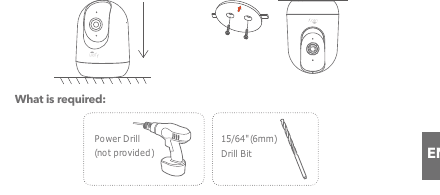
需要什么:
- 电钻(未提供)
- 15/64" (6mm) 钻头
5. 注册账户
操作相机所需的CloudEdge应用程序。注册云存储完全是可选的,并且在使用板载 Micro SD 卡时实际上没有必要。
打开 APP 注册帐户。进入登录界面,点击“注册”。
使用您的电子邮件地址注册,然后单击“下一步”。
为您的APP设置“昵称”和“密码”,点击“完成”即可完成。
6. 为相机设置 WiFi
相机只能连接到 2.4 GHz WiFi 信号。它不支持使用 5 GHz 信号。因此,请确保连接到网络上的 2.4 GHz 信号,如下图所示。
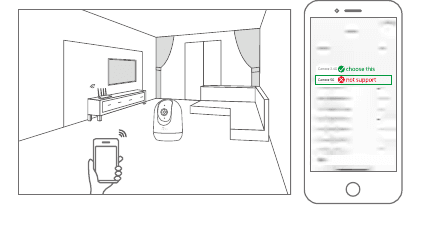
将手机和相机靠近路由器(最大距离5 meters/16 feet)。
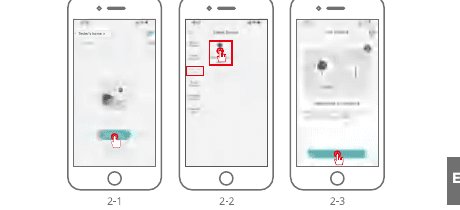
登录“CloudEdge”,然后点击中间的“+”图标。点击“相机”添加设备。
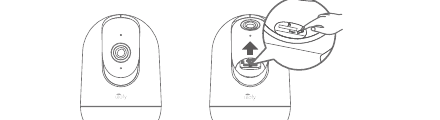
重置设备并等待红色指示灯闪烁,然后点击“下一步”。
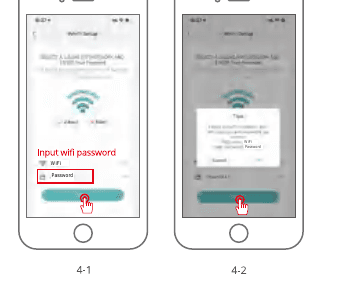
选择设备需要连接的Wi-Fi(您家的Wi-Fi),输入密码,点击“下一步”。
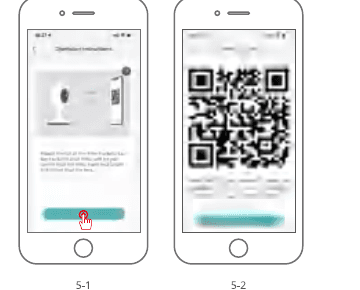
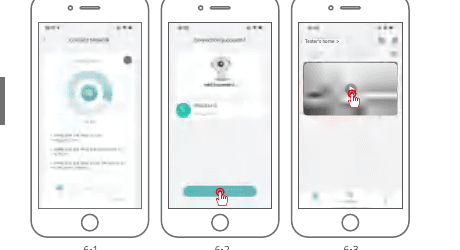
使用相机扫描手机上的 QR 代码,如下所示。扫描完成后,您将听到提示音,然后按“下一步”。
When connecting, as stated earlier, you should make sure that the router, mobile phone and the camera and are as close together as possible (max 5 meters/16 feet). When a successful connection occurs a "click" will be heard and a checkmark will be noted as shown below. The camera will show with a numerical name that can be changed to your likings such as Driveway Camera, Street View Camera or whatever.
7. 安全声明
Precautions
- The applicable working temperature of this product is -20℃~50℃, please do not use it in an environment where the temperature is too high or too low.
- Please do not place the lens close to or facing the glass, white walls, or lighting objects, in order to avoid the picture being too bright, dark, or white.
- Please make sure that the camera is installed within the good Wi-Fi signal range, and placed it as near as possible to the router and try to install it far away from metal and microwave ovens that may affect the signal.
售后服务和技术支持
如需售后服务,请联系[email protected]。 Describe the camera issue, and inform us of the order number, camera model, and Serial Number on the camera sticker, we will reply to you as soon as possible.
法律声明
符号: ⎓ 直流电(DC)
Don't throw batteries or out of order products with the household waste (garbage). The dangerous substances that they are likely to include may harm health or the environment. Make your retailer take back these products or use the selective collect of garbage proposed by your city.
Hereby, Ulofy declares the radio equipment type 'PTcam' is in compliance with the Directive 2014/53/EU. The full test of the EU declaration of conformity is available at the Internet address: www.getulofy.com